Skip to content

Track your money without typing.

Finansealy logs your payments from bank and e-wallet notifications, screenshots, receipts and voice. You just check once. Your data is encrypted and OTP codes never leave your phone.

  • Coming soon to Google Play
  • Coming soon to App Store

For Android and iPhone. Start free. Premium comes with a free trial. See pricing

  • Encrypted
  • OTPs stay on your phone
  • Never sold
  • Records only

The app screens on this page are in Bahasa Indonesia; the app is in English too.

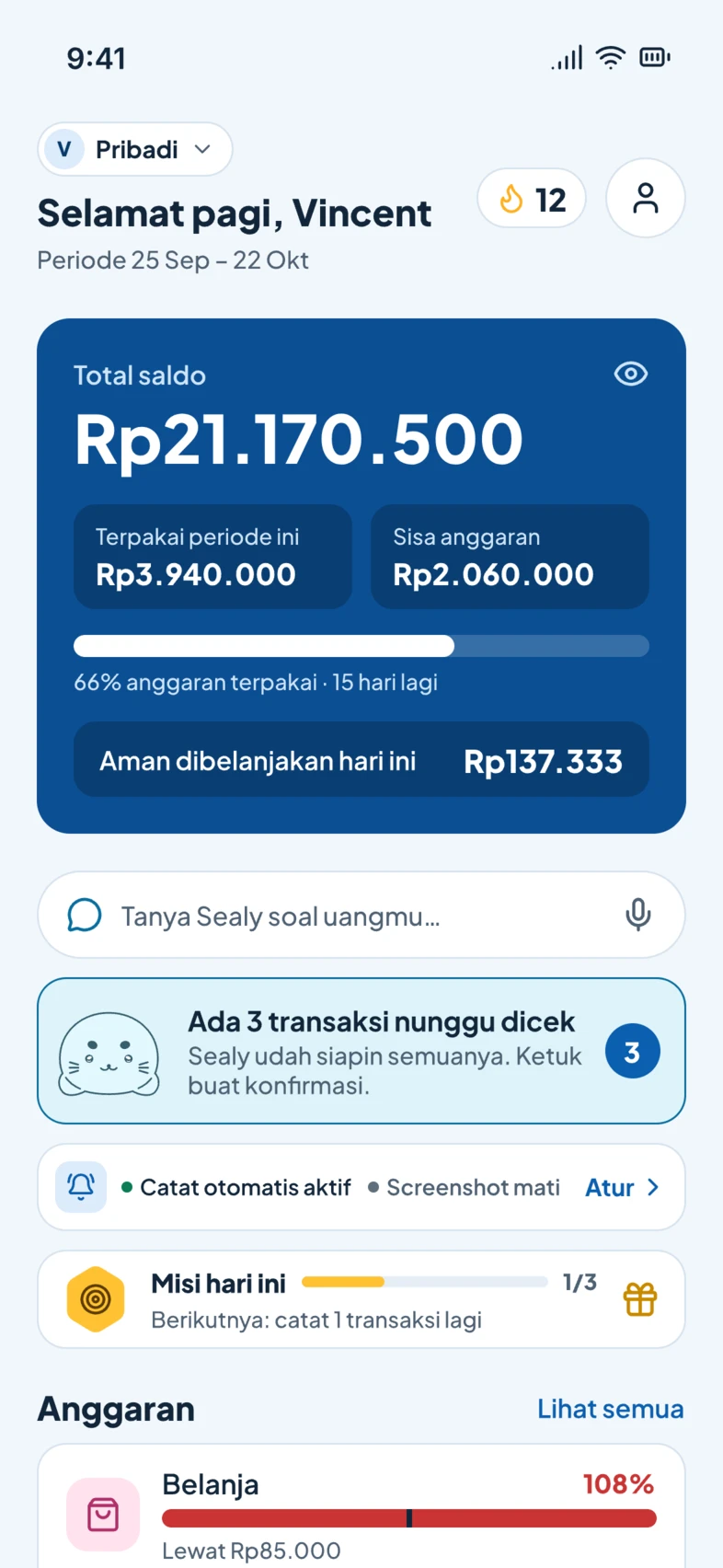
The Finansealy Home screen: total balance, budget used, today's safe-to-spend, the Ask Sealy box, and 3 transactions waiting to be checked.

Pay as usual. Finansealy does the logging.

No new habits needed. Every way you pay leaves a trace, and Finansealy turns it into a tidy record.

  1. 1

    You pay

    QRIS, transfer, e-wallet or card, as usual.

  2. 2

    Finansealy captures

    A notification, screenshot, receipt or voice note becomes a transaction: amount, merchant and category.

  3. 3

    You check once

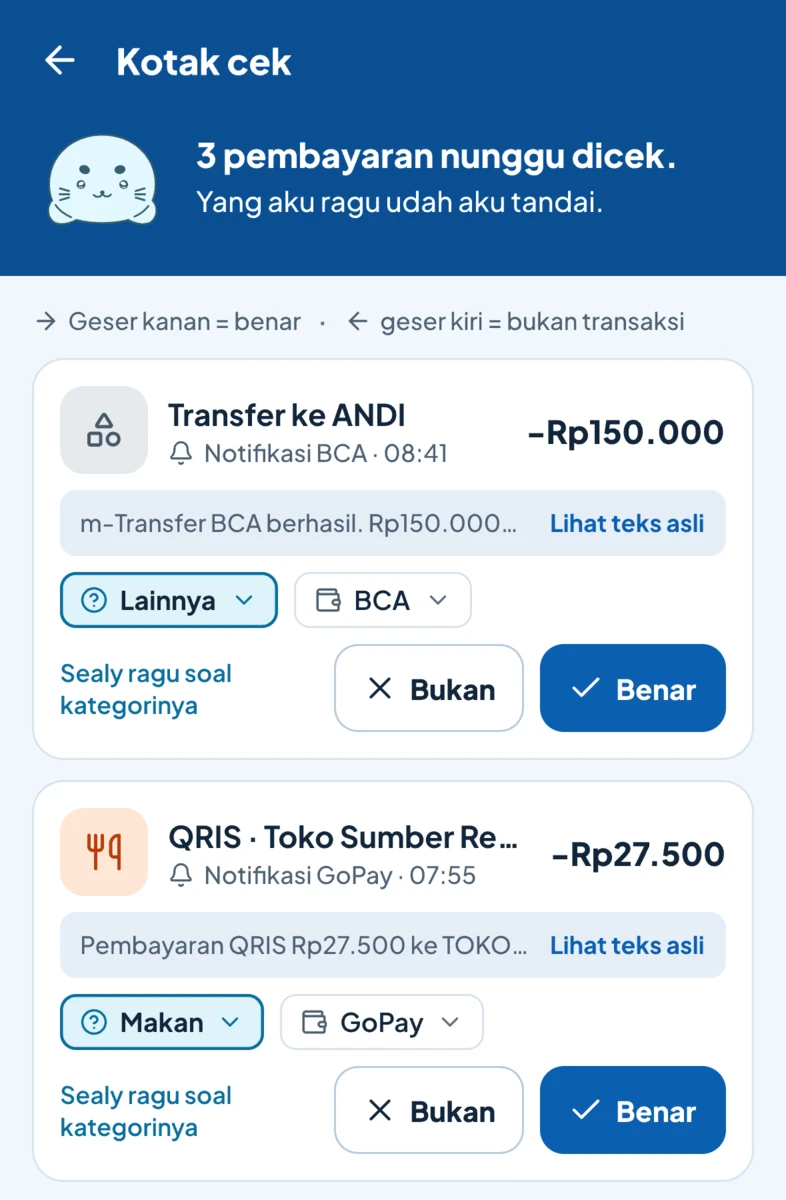
    Confident captures are saved. Unsure ones wait in your Review inbox for a one-tap confirm.

Review inbox: payments from BCA and GoPay notifications, each with a category, an account and a confirm button. What Sealy is unsure about is marked.

Android

Automatic from notifications

Finansealy reads payment notifications from bank and e-wallet apps. A filter on your phone checks them first, so only money notifications are processed.

  • Works with any bank, e-wallet and QRIS, with no per-bank parser
  • OTP codes are ignored and never leave your phone
  • Mute any app, any time
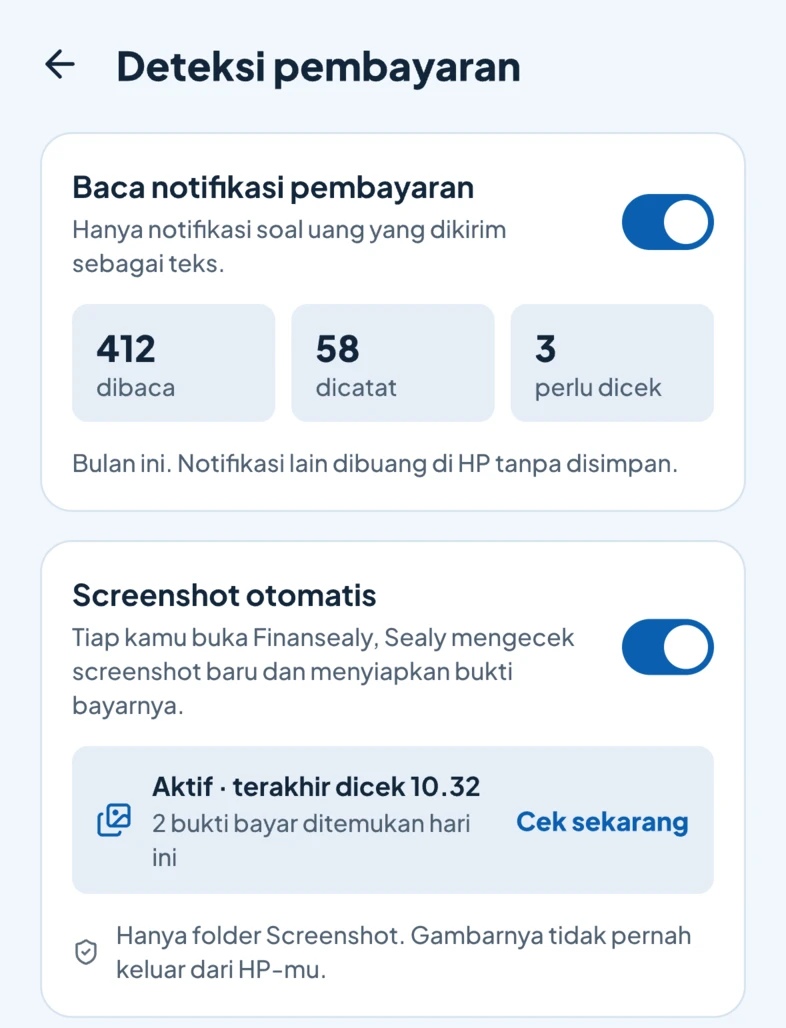
Payment detection settings: notifications read and logged this month, and automatic screenshots that look for new payment proofs.

iPhone

One tap, no typing

iPhone doesn't let apps read other apps' notifications, so on iPhone Finansealy is built around a single tap.

  • Scan payment screenshots and transfer receipts
  • Share receipts from the Share menu, or forward e-receipts by email (Premium)
  • Widgets, Shortcuts and Control Center. From iOS 27, a Shortcuts automation can pass on bank notifications
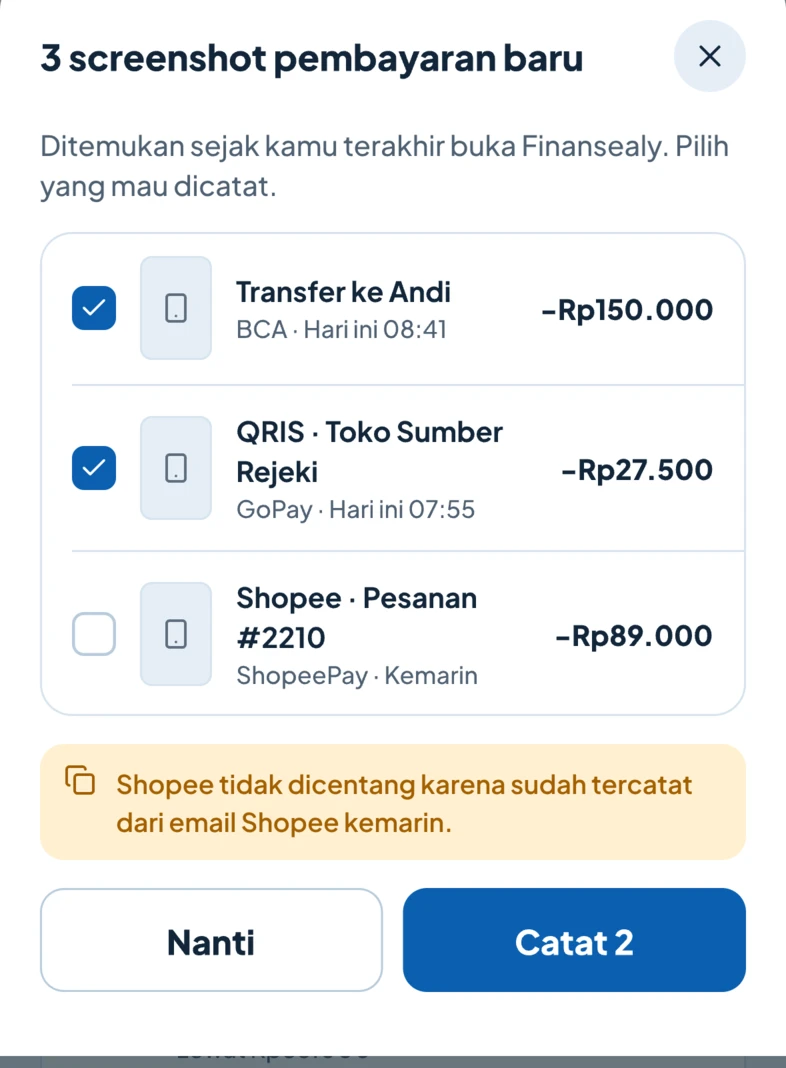
Three new payment screenshots found. Shopee is unticked because it was already logged from an email.

Many ways in, one record

Besides notifications and screenshots, there are other quick ways in. They all land in the same records.

  • Voice result for "lunch twenty-five thousand with GoPay": Lunch, Rp25.000, GoPay, ready to save.

    Voice

    "Lunch 25 thousand with GoPay." Check it, save it, and Finansealy reads it back.

  • A scanned Indomaret receipt of Rp245.000: six items read, each with its category.

    Receipts

    Snap a shopping receipt; items are read and can be split by category.

  • Your Finansealy address for receipts by email, with a switch to stop accepting e-receipts.

    Receipts by email

    Forward e-receipts from your bank, Tokopedia or Shopee (Premium).

  • Home-screen widget with Log, Voice and Scan buttons, plus a shortcut that logs your latest screenshot.

    Widgets & Shortcuts

    Log from your home screen, Control Center or Quick Settings.

One payment, one record. A notification and a screenshot of the same payment are merged automatically. A top-up from BCA to GoPay is a transfer, not two expenses.

Built to be trusted.

Money data is personal. Finansealy is designed so as little of it as possible ever leaves your phone.

To read amounts and merchants, our third-party AI provider only receives masked payment text, and only once you agree. Never images.

Is my data safe?
OTPs never leave your phone
The filter on your phone drops OTP codes and anything that isn't about money before anything is sent.
Encrypted everywhere
On your phone, on our servers, in backups and in transit.
Never sold
No ads. Your data isn't sold and isn't used to train AI.
Records only
Finansealy can't move your money and doesn't connect to any bank account.
Insights: this period's spending, income and savings, Sealy's highlights, Ask Sealy, and spending by category.

Know where your money goes, not just how much.

Tidy records are only the start. Finansealy turns them into budgets, reports and answers.

  • Payday-to-payday periods

    Paid on the 25th? Budgets and reports follow your period, not the 1st to the 31st.

  • Safe to spend today

    Budget left divided by days left, so you know each morning what's safe. Alerts at 80% and 100%.

  • Ask Sealy

    "How much did I spend on food this month?" Answers from your own data, with a chart.

  • Reports and exports

    Reports by category, account and merchant. Excel and PDF exports, plus an email summary at the end of each period.

  • Bills, debts and loans

    Reminders before due dates, debt repayments, and a ready-made reminder message.

  • Savings goals

    Track a new phone or a holiday, with how much to put aside each month.

Logging becomes a habit, not a chore.

Small wins every day, with Sealy cheering you on. Your money screens stay calm and professional.

Daily streak
One entry a day keeps your streak alive. Missed a day? A streak freeze saves it.
Quests and a weekly chest
Three small quests a day. Finish 15 in a week to open the chest.
Levelled badges
Receipt Detective, Sea Saver, Flash Sale Dodger and more, from level 1 to 5.
Period recap
A five-slide story at the end of each period, ready to share without showing amounts.

No leaderboards and no shaming. Choose a Fun, Calm or Off notification style.

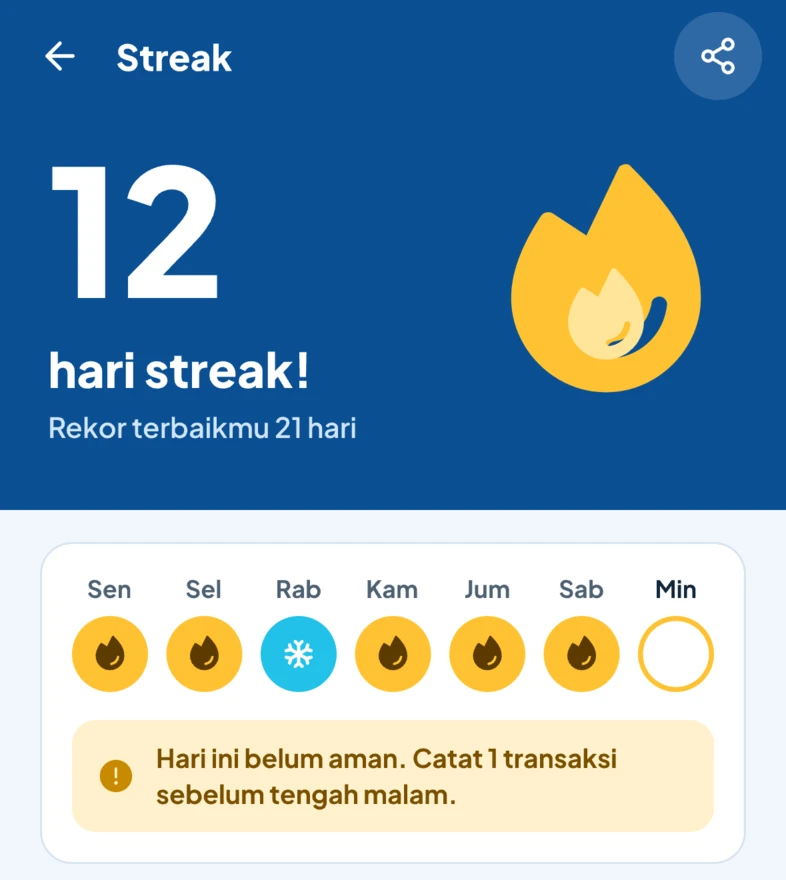
A 12-day streak, with a streak freeze used on Wednesday.
Family workspace activity: who added, changed and confirmed transactions.

A shared ledger that keeps privacy intact.

One ledger for a household, a couple or a shared house. Included in Premium for up to 5 members, and they don't need a plan of their own.

  • Invite by QR code, link, username or email
  • Clear roles: owner, editor or viewer
  • An activity feed shows who logged what
  • Your personal transactions stay private unless you move them

Record-keeping only. No money ever moves in Finansealy. For teams and companies: the Business plan, with reimbursement records, approvals and per-member reports. Contact us to subscribe.

Start free. Upgrade when you need to.

Try Premium free for a month through Google Play or the App Store. After that, keep Premium or stay on Free.

Compare all plans

Free

For building the logging habit.

Rp0 forever

  • 50 AI captures a month
  • 10 Ask Sealy questions a month
  • 3 accounts, 3 budgets, 1 goal
  • Reports for this and last period
  • Export all data (CSV)
Save 47%

Premium

Up to 1.500 automatic captures a month, full reports and a family workspace.

Rp20.750 /month

billed Rp249.000 a year

or Rp39.000/month on the monthly plan

  • 1.500 AI captures and 300 Ask Sealy questions a month
  • Up to 100 accounts, 100 budgets and 50 goals
  • Excel & PDF exports, full history
  • Family workspace for up to 5 people, with a shared AI allowance
  • Reports + PDF sent to your email each period
  • Log e-receipts by email
Try Premium free

Free for 1 month, then Rp249.000/year. Renews automatically; cancel any time in Google Play or the App Store.

Lifetime

Limited founders' offer

Everything in Premium, paid once.

Rp599.000 one-time

  • Everything in Premium, forever
  • The same monthly AI allowance as Premium
  • One purchase for all your devices

Frequently asked

Didn't find your answer? Every question and how to reach us are on the Help page.

See all questions

Is my data safe?

Yes. Your data is encrypted on your phone and on our servers, and encrypted in transit. OTP codes never leave your phone. We never sell your data. Finansealy only records: the app cannot move your money and doesn't connect to any bank account.

  • Encrypted
  • OTPs stay on your phone
  • Never sold

Why does Finansealy ask for notification access?

On Android, Finansealy reads payment notifications from banks and e-wallets so transactions are logged automatically. A filter on your phone checks them first: only payment text is processed, everything else is discarded without being stored, and OTP codes are never sent anywhere. You can mute any app or turn access off at any time in Settings > Payment detection.

Can my iPhone log payments automatically?

iPhone doesn't let apps read other apps' notifications, so on iPhone it takes one tap: scan payment screenshots, share receipts from the Share menu, forward e-receipts to your Finansealy address (Premium), or use widgets and Shortcuts. From iOS 27, a Shortcuts automation can pass bank notifications to Finansealy automatically.

How does Finansealy use AI?

To read amounts, merchants and categories, payment text (never images) is sent to our third-party AI provider once you agree. Names and account numbers are masked where possible, OTP codes are never sent, and your data isn't used to train AI. Ask Sealy answers from your own workspace data and never gives investment advice.

What happens after the free trial?

You can try Premium free for a month through Google Play or the App Store, with a reminder 3 days before the trial ends. After that the subscription starts and renews automatically, unless you cancel before then in Google Play or the App Store. If you cancel, you're back on Free and your data is never deleted: anything over the Free limits becomes read-only, and you choose which accounts, budgets and goals stay active.

How do I share a ledger with my family?

With Premium you can create one family workspace for up to 5 people, including you. Invite by QR code, link or username, then pick a role: editors can log and edit, viewers can only look. Your personal transactions stay private unless you move them into the family workspace. Finansealy only records; no money moves.

Start logging today.

Download Finansealy, pay as usual, and let Sealy do the logging.

Start free. Premium comes with a free trial.

  • Coming soon to Google Play
  • Coming soon to App Store